
A sleek dark design is not enough anymore. If I am paying premium Ghost theme money, I expect strong differentiation, clear documentation, and a setup experience that feels worth the price. Juniper gives me a polished dark magazine look for writers, creators, and publishers, but after reviewing the official site, product page, docs, and demo, I do not think it fully justifies its $99 price tag.
Storied Themes presents itself as a premium Ghost theme shop trusted by 200+ creators, with a focus on helping bloggers launch quickly without tech hassle. Juniper’s product page adds a positive customer testimonial about support, so I can see that the brand is trying to build confidence around service and ease of use.
TL;DR — Key takeaways
- Juniper looks modern and clean, especially if you want a dark Ghost theme with a magazine-style feel.
- I like the built-in featured post hero, grid or list post feed, optional sidebar, and simple design controls in Ghost Admin.
- The demo shows thoughtful UI touches like search, sign-in access, tag pages, author pages, and home layout variations.
- The biggest weakness is documentation depth. The official Juniper docs are short and basic, which makes the theme feel thinner than its price suggests.
- Based on the performance and accessibility brief you supplied, PageSpeed looks excellent, but ADA/WCAG compliance still falls short at 80% with 15 issues.
What makes Juniper unique?
Juniper’s clearest differentiator is its fully dark editorial aesthetic paired with a simple Ghost-native settings panel for featured posts, feed layout, sidebar controls, and color tuning. The problem is that this uniqueness feels mostly visual, not structural, so I do not see enough here to justify the premium price on features alone.
Theme overview
Juniper is positioned as a modern Ghost theme for writers, creators, and publishers. From the official product page, the value pitch is straightforward: dark styling, a polished look, and a handful of practical publishing controls rather than a huge feature stack.
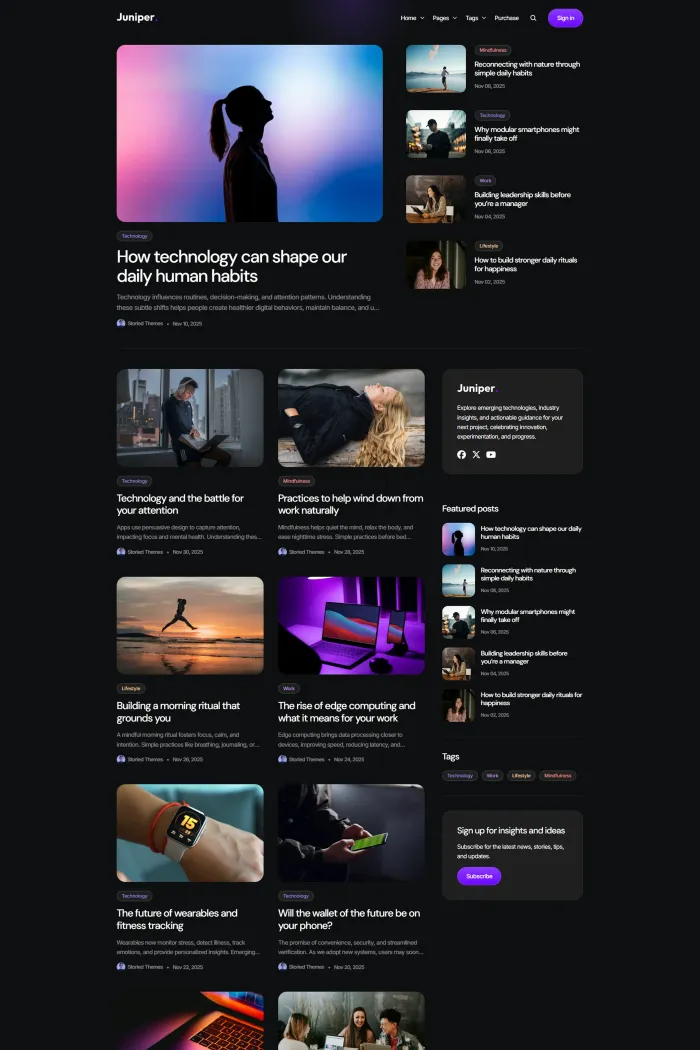
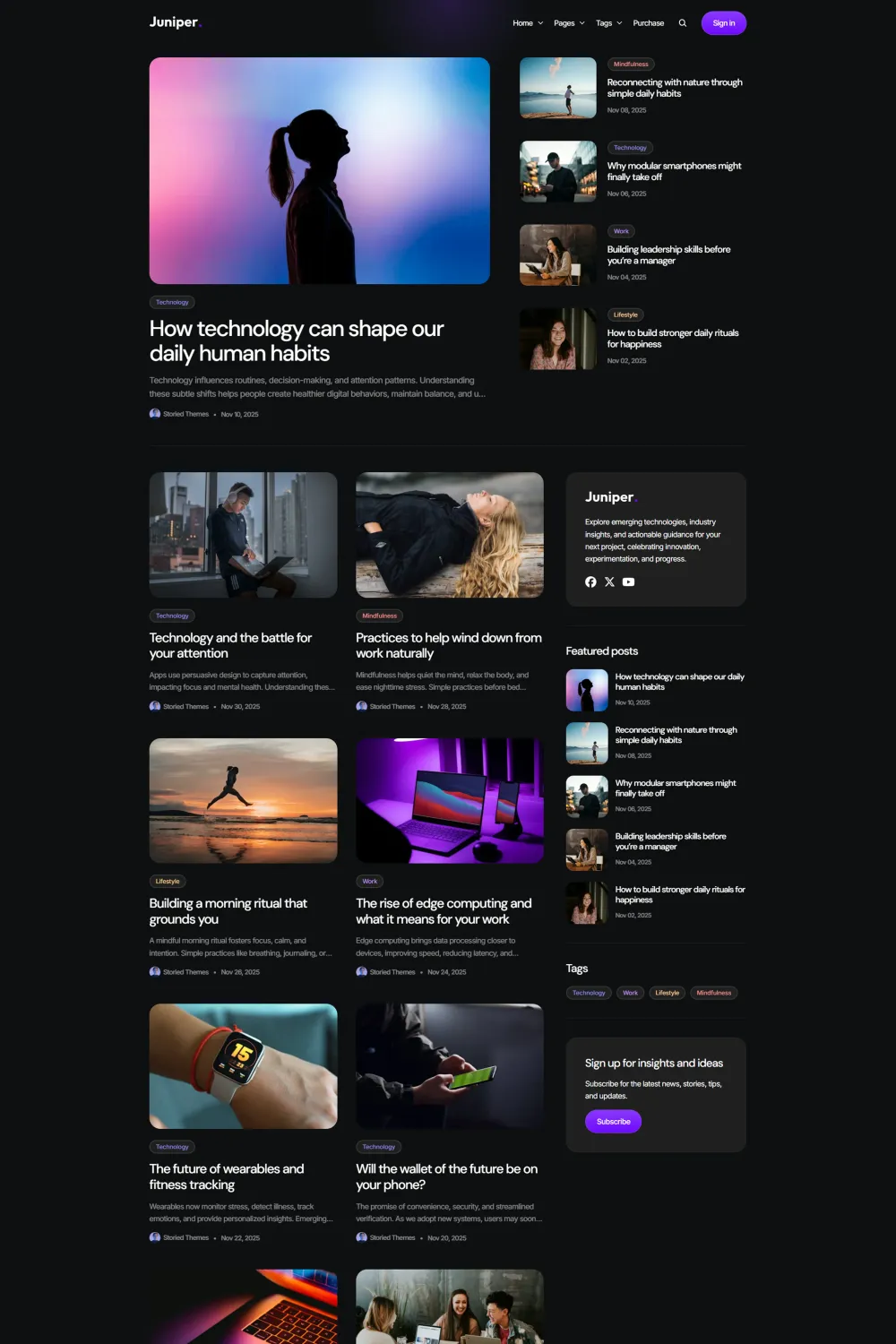
From the demo, I can see a clean editorial UI with a featured hero area, card-based posts, tags, a subscribe block in the sidebar, and multiple visible home variants labeled Default, No sidebar, and List. I also see dedicated author, tag, and post pages, plus search and sign-in links, which helps the theme feel complete from a front-end UX perspective.
Where my confidence drops is in the documentation. The official docs are a single short page covering installation, navigation, featured posts, settings, a couple of recommendations, support, and credits. That is enough to get started, but it is nowhere near the level of depth I want from a premium editorial Ghost theme in 2026.
I also could not verify an exact minimum Ghost version from the official Juniper product page or docs I reviewed. For buyers who care about long-term maintenance and upgrade clarity, that missing detail matters.
Top features of Juniper
The official docs are brief, but they do confirm a few useful features and controls:
- Fully dark aesthetic as the main design identity for the theme.
- Featured posts hero on the homepage, with the option to show a carousel or hide it completely.
- Minimum five featured posts required if you want the carousel to work properly.
- Grid or list feed layout for the post archive.
- Sidebar toggle so you can run the layout with or without the sidebar.
- Sidebar subscribe title and text controls for a simple newsletter-style callout.
- Primary navigation dropdowns using the
##marker and dashed submenu items. - Secondary navigation footer columns using the same
##marker idea for column starts. - Brand settings for site description, accent color, icon, and logo.
- Button and color controls including primary button color, button text color, and default tag color.
- Logo height control from 20px to 68px.
- Author social links in the footer and sidebar via author slug input.
Pros & cons
Pros
- The dark magazine design looks polished and current. For a writer-focused or creator-focused publication, the visual style is clean and attractive.
- The theme settings are easy to understand. Feed layout, sidebar visibility, logo height, colors, and featured posts are all simple controls that non-technical users can manage.
- The demo UI feels usable. I like that I can already see author pages, tag pages, a post page, search access, sign-in access, and multiple homepage variants.
- Based on the numbers you supplied, its PageSpeed Accessibility, Best Practices, and SEO scores are all 100, which is excellent on paper.
Cons
- The documentation is very limited. I only found a short official doc page, and that makes Juniper feel under-documented for a paid Ghost magazine theme.
- I do not see enough feature depth to justify the $99 USD price compared with more differentiated premium themes.
- Storied Themes markets a broader lineup of multipurpose themes for creators and bloggers, and Juniper does not feel especially distinct beyond its dark look.
- I could not verify the exact minimum Ghost version from the official Juniper sources I reviewed, which is a detail I expect to see clearly documented.
- The accessibility picture is not as strong as the PageSpeed summary suggests. Your supplied ADA/WCAG brief says Juniper is not compliant, scores 80%, and has 15 issues.
Who is Juniper ideal for?
For writers
If you mostly want a dark, stylish publishing shell and you do not need an advanced feature set, Juniper can work. The layout is quiet, readable, and editorial enough for essays, commentary, and long-form blog posts.
For creators
Juniper suits creators who care more about brand feel than deep configuration. The visual tone is strong, and the Ghost Admin controls are simple, but I would only recommend it if you are comfortable with light documentation and a pretty basic settings surface.
For magazine-style publishers
This is the official use case that makes the most sense. The theme has featured posts, tag-driven navigation, list or grid feeds, and visible author and tag pages. Still, I think magazine buyers can do better if they want richer structure, better documentation, or stronger value.
Performance, security, accessibility, and SEO
On raw PageSpeed-style scoring, Juniper looks great based on the test results you provided: Accessibility 100, Best Practices 100, and SEO 100. If I looked only at those three numbers, I would expect a very strong technical package.
But the ADA/WCAG brief paints a weaker picture. You supplied an 80% score with 15 issues, including repeated image alternative text, a missing level-one heading issue, and content outside landmarks. For me, that is the more important warning sign, because accessibility gaps matter in real-world publishing.
On security, I do not see special security features documented on the official Juniper pages. The materials focus on design, setup, and support rather than advanced technical hardening, so I would treat Juniper as a standard Ghost theme rather than a security-led product.
From an SEO and AEO perspective, the basics are present: site description support, clean navigation, structured author and tag views, and a focused editorial layout. That helps, but I would not call Juniper a deeply SEO-differentiated modern Ghost publication theme based on the official materials alone.
Quick installation & customization guide
The setup path in the official docs is simple:
- Upload
juniper.zipfrom Ghost Admin under Design and activate it. - Configure primary and secondary navigation from Ghost’s navigation settings.
- Use
##to start dropdowns in primary navigation and footer columns in secondary navigation. - Mark at least five posts as featured if you want the homepage featured-post carousel.
- Tweak brand settings, button colors, tag colors, logo height, post feed layout, sidebar text, author social slug, and footer copyright from the design settings.
That simplicity is a plus, but it also reflects the narrow scope of the docs. I can get started quickly, yet I do not get much deeper guidance beyond the basics.
Rating & recommendation
My rating: ★★☆☆☆ (2/5)
I do not recommend Juniper for most buyers. Yes, it looks good. Yes, the dark UI is polished. Yes, the basic publishing controls are easy enough. But once I look past the surface, I see a theme with short documentation, limited differentiation, and questionable value for $99.
If you only want a simple Ghost theme for writers and you strongly prefer this exact dark style, Juniper may still work for you. But if I am spending premium money on a Ghost magazine theme for publishers, I want either more features, more originality, better documentation, or all three. Juniper does not give me enough of that.
FAQs
Is Juniper a good Ghost theme for magazines?
It can work for magazine-style publishing because it has featured posts, tag-led structure, and grid or list feeds. I still would not call it one of the strongest value picks in this category.
Can I switch Juniper between grid and list layouts?
Yes. The official settings let you choose Grid or List for the post feed.
Does Juniper support a sidebar?
Yes. The docs include a sidebar toggle, and the demo also shows a no-sidebar variation.
How do featured posts work in Juniper?
Featured posts appear in the homepage hero. You can show a carousel or disable it, and the docs recommend having at least five featured posts.
Can I create dropdown menus in Juniper?
Yes. In primary navigation, you use ## to begin a dropdown, then prefix submenu items with -.
Does Juniper have strong documentation?
No, not really. The official docs are helpful for basics, but they are short and not very detailed for a premium theme.
Is Juniper accessibility compliant?
Based on the ADA/WCAG results you supplied, no. The brief says it is not compliant and has 15 issues.
Juniper alternatives
- Vincent feels far more feature-rich for serious editorial publishing. It stands out with nine post templates, flexible homepage sections, color presets, testimonials, logo walls, and stronger no-code control for magazine-style sites.
- Choi is a better fit if you want a playful editorial mood with six color schemes, featured sliders, 11 font options, homepage elements, and membership support for travel, lifestyle, or wellness content.
- Aspect is the stronger technical magazine option if you need co-author support, native search, native comments, dark/light mode, lazy loading, AJAX loading, infinite scroll, TOC, and featured video support.
- Tozan looks like the best modern magazine alternative in this group. It offers light, dark, and sepia modes, flexible feed styles, multiple membership layouts, native comments, and stronger accessibility positioning.
Conclusion
Juniper is attractive, but I do not think attractive is enough at this price. The dark aesthetic is polished, the setup is easy, and the UI feels clean. Still, the documentation is thin, the differentiation is weak, and the value-for-money case just does not convince me. If I were choosing a premium editorial Ghost theme today, I would keep looking.